The SDK is stuck on 5.10 but a lot of support for the SG2000 has been added to the mainline kernel since then. So theoretically it should be possible to run a mainline kernel on the Duo S (albeit with some features missing) but I’m not sure how, if it is even possible.
4 Likes
It should be possible. Here are the features mainlined into Linux: Home · sophgo/linux Wiki · GitHub
Here is a generalized overview of what it takes to get a newer kernel running:
- Get or define a DTS for the Duo S. It is not mainlined yet but you can see v3 here: Making sure you're not a bot!
- Compile the kernel and DTS. I have my
6.17config here: 6.17 duo-s .config ($4905818) · Snippets · GitLab . It compiles to a.gzwhich can be changed, just make sure to update the FIT image. - Create a uBoot FIT image. I posed my
multi.itshere: Milk-V Duo S uBoot FIT device tree source ($4928874) · Snippets · GitLab . You will need theImage.gzand.dtbin the same directory, then runmkimage -f multi.its boot.sd.mkimageis part of the uboot-tools package. - Copy the
boot.sdfile to the SD card. The SD card will have to be partitioned correctly, I started by using the released image and updating the OS to my own choosing (Debian in this case) and updating the FIT image with my updated kernel and DTB. - Boot the board and make sure uBoot loads and executes the new kernel correctly
2 Likes
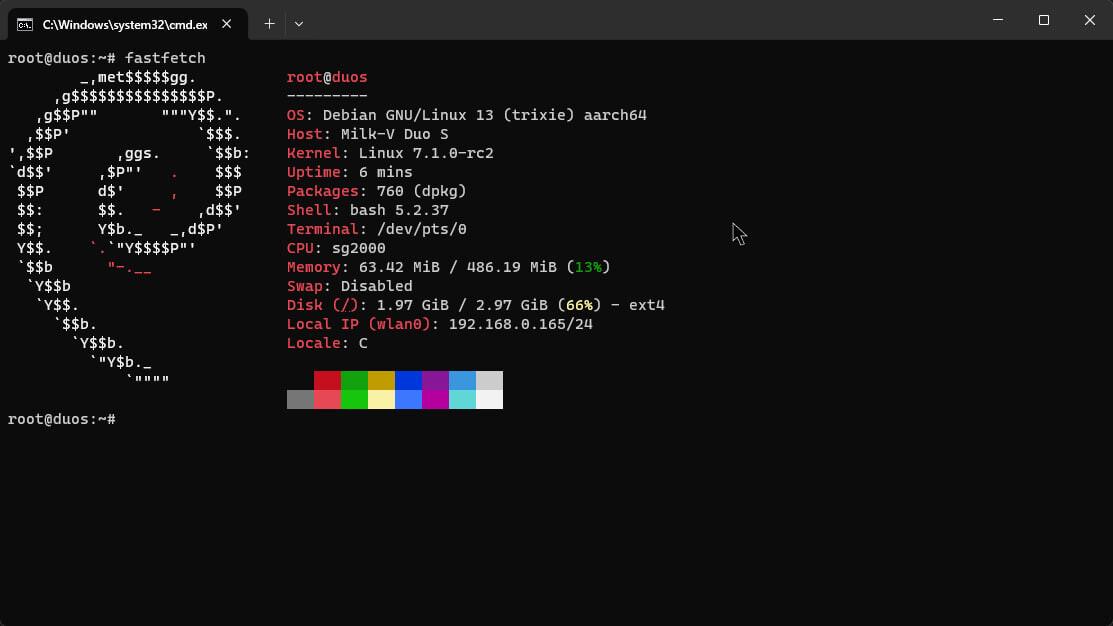
In progress of porting Debian 13 (Trixie) to Milk-V Duo S (SD)’s ARM64 core.
It boots fine with latest mainline kernel 7.1.0-rc2, got Wi-Fi and USB RNDIS to work fine
I’ve got 7.0 RISC-V running on Ubuntu: GitHub - queenkjuul/milkv-duo-ubuntu: Ubuntu on the Milk-V Duo sbc · GitHub
I’ve also got the Duo S wireless drivers working, and some of the pending upstream drivers (remoteproc for arduino, PWM, some other stuff)
Not quite ready to publish ready-made images but the kernel patches in that repo enable a lot of hardware
3 Likes