irradium - source based Linux distribution CRUX adhering to ideology keep it simple, has its own package system , also supports the port system .
irradium development
irradium - source based Linux distribution CRUX adhering to ideology keep it simple, has its own package system , also supports the port system .
irradium development
added support in images_build_kit
installation README.TXT
kernel 6.6.87
loading not tested on hardware.
irradium-3.8-riscv64-core-milk_v_megrez-6.6.87-build-20250607.img.zst
irradium-3.8-riscv64-core-milk_v_megrez-6.6.87-build-20250607.img.zst.sha256
irradium-3.8-riscv64-xfce-milk_v_megrez-6.6.87-build-20250607.img.zst
irradium-3.8-riscv64-xfce-milk_v_megrez-6.6.87-build-20250607.img.zst.sha256
Is it possible to get/buy this board with delivery to Ukraine? I tried to buy it both on arace.tech and in 2 different stores on aliexpress, without result.
I’m just happy that there’s another working system besides the RockOS image. The distribution sounds interesting. Thank you for this posts and your great development!
Do I understand correctly that the core image has no pre-installed desktop?
I think this board seems to be sold out, unfortunately. I only got it by chance through someone who was selling it privately . I hope that changes soon. :-/
yes, it is, but it has not been tested on the board itself.
I’ll be happy to test it. 
installation README.TXT
kernel 6.6.99
mirror 1, mirror 2, mirror 3, mirror 4
irradium-3.8-riscv64-core-milk_v_megrez-6.6.99-build-20250718.img.zst
irradium-3.8-riscv64-core-milk_v_megrez-6.6.99-build-20250718.img.zst.sha256
irradium-3.8-riscv64-xfce-milk_v_megrez-6.6.99-build-20250718.img.zst
irradium-3.8-riscv64-xfce-milk_v_megrez-6.6.99-build-20250718.img.zst.sha256
installation README.TXT
kernel 6.6.99
mirror 1, mirror 2, mirror 3, mirror 4
irradium-3.8-riscv64-core-milk_v_megrez-6.6.99-build-20250723.img.zst
irradium-3.8-riscv64-core-milk_v_megrez-6.6.99-build-20250723.img.zst.sha256
irradium-3.8-riscv64-xfce-milk_v_megrez-6.6.99-build-20250723.img.zst
irradium-3.8-riscv64-xfce-milk_v_megrez-6.6.99-build-20250723.img.zst.sha25
installation README.TXT
kernel 6.16.0
mirror 1, mirror 2, mirror 3, mirror 4
irradium-3.8-riscv64-core-milk_v_megrez-6.16.0-build-20250802.img.zst
irradium-3.8-riscv64-core-milk_v_megrez-6.16.0-build-20250802.img.zst.sha256
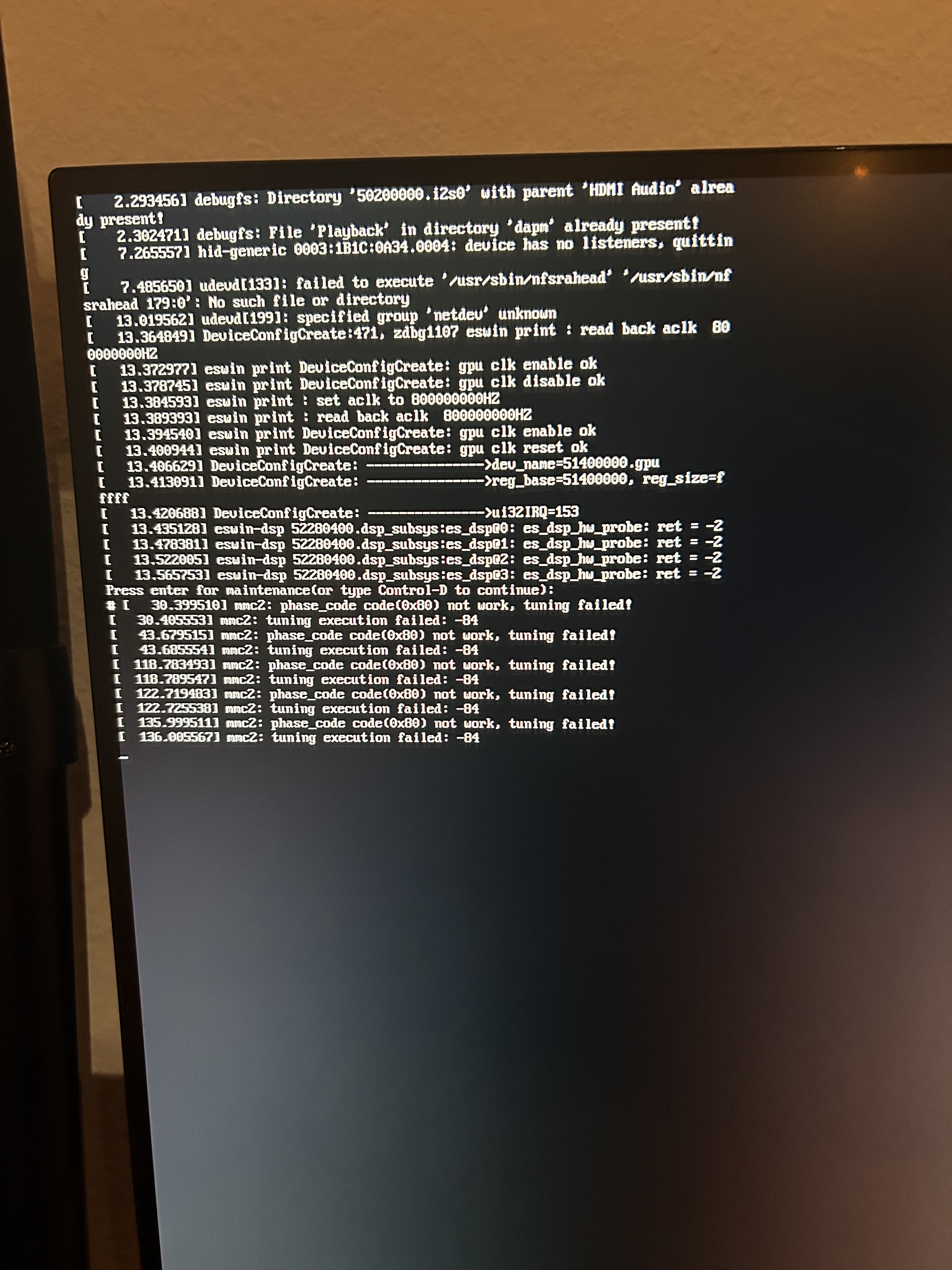
HDMI output not working
boot log
performance testing on lichee pi 4a T-Head th1520 and banana pi f3 SpacemiT k1, mesa package compilation:
time prt-get update mesa
lichee pi 4a T-Head th1520
prt-get: updated successfully

real    65m2.670s
user    231m38.567s
sys     14m14.824s
banana pi f3 SpacemiT k1
prt-get: updated successfully

real    48m32.365s
user    342m27.137s
sys     14m44.450s
visionfive 2 JH7110
prt-get: updated successfully

real    69m52.519s
user    248m33.483s
sys     11m3.013s
StarPro64 EIC7700X
prt-get: updated successfully

real	42m27.966s
user	154m0.664s
sys	8m11.515s
Great comparison! I noticed you tested the Lichee Pi 4A, Banana Pi F3, and others—but since this is the Megrez forum, I was curious: Do you have any performance numbers for the Megrez board too? Would love to see how it stacks up!
StarPro64 on the same processor, I don’t have Megrez for testing.
I’ve been trying version 6.6.99 this days. Unfortunately, my attempts to install Irradium have always failed. Very often the memory is suddenly locked, making it impossible to access the file system, let alone run startx. The best I’ve managed was XFCE without graphics card support and with an Ethernet internet connection. My Wi-Fi adapter didn’t work. It didn’t work with RockOS either at first, but I was able to reinstall the drivers. Something seems to be blocking it here. I could install Git, but it never ran properly, no matter which source I tried. Today I tried to start it again, and XFCE wouldn’t run anymore. Once again, the file system would only be executable with read permissions.
I’d be happy if I could get it running on Megrez. Especially since the RockOS packages are rather outdated (and Debian in general), it would have been a nice alternative.
I’ve tried Balena Etcher and the Raspberry Pi Imager so far. Is there anything wrong with unpacking the image?
unpack in Linux
zstd -d irradium-3.8-riscv64-xfce-milk_v_megrez-6.6.99-build-20250723.img.zst
and then write via dd or as described in the README.TXT. in Windows unpack 7zip
try to do fsck and boot again, for some reason any reboot breaks the file system.
installation README.TXT
kernel 6.6.101
mirror 1, mirror 2, mirror 3, mirror 4
irradium-3.8-riscv64-core-milk_v_megrez-6.6.101-build-20250808.img.zst
irradium-3.8-riscv64-core-milk_v_megrez-6.6.101-build-20250808.img.zst.sha256
irradium-3.8-riscv64-xfce-milk_v_megrez-6.6.101-build-20250808.img.zst
irradium-3.8-riscv64-xfce-milk_v_megrez-6.6.101-build-20250808.img.zst.sha256
installation README.TXT
kernel 6.6.103
mirror 1, mirror 2, mirror 3, mirror 4, mirror 5
irradium-3.8-riscv64-core-milk_v_megrez-6.6.103-build-20250830.img.zst
irradium-3.8-riscv64-core-milk_v_megrez-6.6.103-build-20250830.img.zst.sha256
irradium-3.8-riscv64-xfce-milk_v_megrez-6.6.103-build-20250830.img.zst
irradium-3.8-riscv64-xfce-milk_v_megrez-6.6.103-build-20250830.img.zst.sha256
installation README.TXT
kernel 6.6.106
mirror 1, mirror 2, mirror 3, mirror 4, mirror 5
irradium-3.8-riscv64-core-milk_v_megrez-6.6.106-build-20250913.img.zst
irradium-3.8-riscv64-core-milk_v_megrez-6.6.106-build-20250913.img.zst.sha256
irradium-3.8-riscv64-xfce-milk_v_megrez-6.6.106-build-20250913.img.zst
irradium-3.8-riscv64-xfce-milk_v_megrez-6.6.106-build-20250913.img.zst.sha256